 Dbak91
Custom Website Development: What It Involves and Costs
Custom website development means a website designed and built around your needs, instead of a template with your logo added. You describe the problem, the site is planned to solve it, and it is built, tested and launched. In the UK, agency-built custom sites are often quoted at roughly £4,250 to £17,000 and 8 to 30 weeks. A small, clearly scoped project with one developer can look quite different. This guide explains the stages, what moves the price and timescale, and how custom Android apps work.
Dbak91dbak91.co.ukA Website Built Around Your NeedsDbak91 develops custom websites for small businesses and individuals, with plain-English support and practical digital solutions.Explore Dbak91’s workTL;DR
- Custom development suits you when a template cannot do what you need, or when you want full control of layout, features and accessibility.
- A typical workflow has seven stages: goals, structure, design, content, build, testing and launch, then maintenance.
- Cost and timing depend mostly on the number of features, integrations, how many review rounds you need, and how quickly you supply content.
- A custom Android app follows a similar path: requirements, design, build, testing, release and ongoing updates.
- Accessibility works best when it is planned from the start, not added at the end.
Table of Contents
- What custom website development actually is
- When a custom build makes sense
- The website development workflow, step by step
- What affects cost and timescale in the UK
- Custom Android app development: how it works
- Designing for accessibility from the start
- My perspective
- Working with me
- How to prepare for a custom website project
- Common mistakes to avoid
- FAQ
- Sources
What custom website development actually is
A custom website is planned and coded for one specific person or business. A template site starts from a ready-made design. A custom site starts from your questions: who visits, what do they need to do, and what should happen next?
That can mean a simple five-page site with a layout built to your content. It can also mean booking forms, a members area, or a connection to another system. “Bespoke” means the same thing. It is the word some UK agencies prefer.
The three common routes look like this:
| Route | Best for | Main strength | Main trade-off |
|---|---|---|---|
| Website builder | A quick, simple online presence | Fast to start | Limited control of layout and features |
| Template on a content system | Blogs, shops, standard business sites | Many ready-made options | Design and features follow the template |
| Custom-built site | Specific needs, unusual features, full control | Fits your exact requirements | Needs planning, and takes more time at the start |
None of these is wrong. The right choice depends on what your site must do. If your needs are clear and specific, custom development saves you from bending your plans around a template.
When a custom build makes sense
Custom development is worth considering when:
- You need a feature that off-the-shelf options do not offer, such as a particular booking flow or a calculator.
- You want a clean, fast site without extra code you never asked for.
- You or your users have accessibility needs that standard themes handle poorly.
- You want to own and understand what has been built, with plain explanations of how it works.
- Your site is likely to grow, and you want a clear base to build on.
If you only need a simple page to show opening hours and a phone number, a lighter-weight site may be enough. A good developer will tell you which is which and scope the work to match.
The website development workflow, step by step
Most projects follow the same shape, whoever builds them. A seven-stage workflow is common: research and goals, information architecture and sitemap, design, content, build, testing and launch, and maintenance. Here is what each stage means for you.
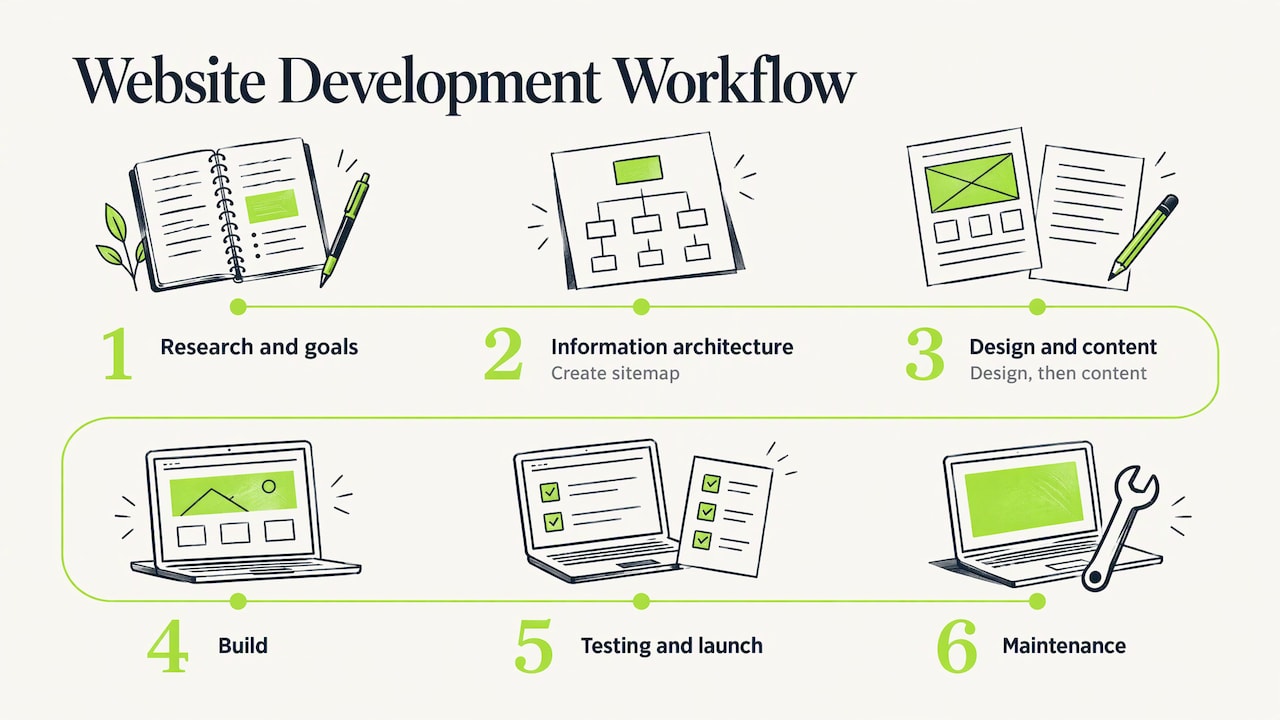
1. Goals and research
I start with plain questions. What is the site for? Who will use it? What should a visitor do in the first minute? You may also gather examples of sites you like and dislike. This stage keeps the project from drifting.
2. Structure and sitemap
Next comes a list of pages and how they connect. A short sitemap is often enough for a small business. It is cheap to change at this point and costly to change after the build.
3. Design
The design covers layout, colours, text size and how the site looks on a phone. You review it and give feedback. Clear, consolidated feedback is one of the biggest things that keeps a project on time.
4. Content
Text, photos and contact details need to be ready. Late content is a very common cause of delay, so it helps to start writing early. Plain, short wording works best for readers and for search engines alike.
5. Build
This is where the design becomes a working site. You should be able to see progress on a private preview link, so there are no surprises.
6. Testing and launch
The site is checked on different phones, browsers and screen sizes. Forms, links and loading speed are tested. Then it goes live on your domain.
7. Maintenance
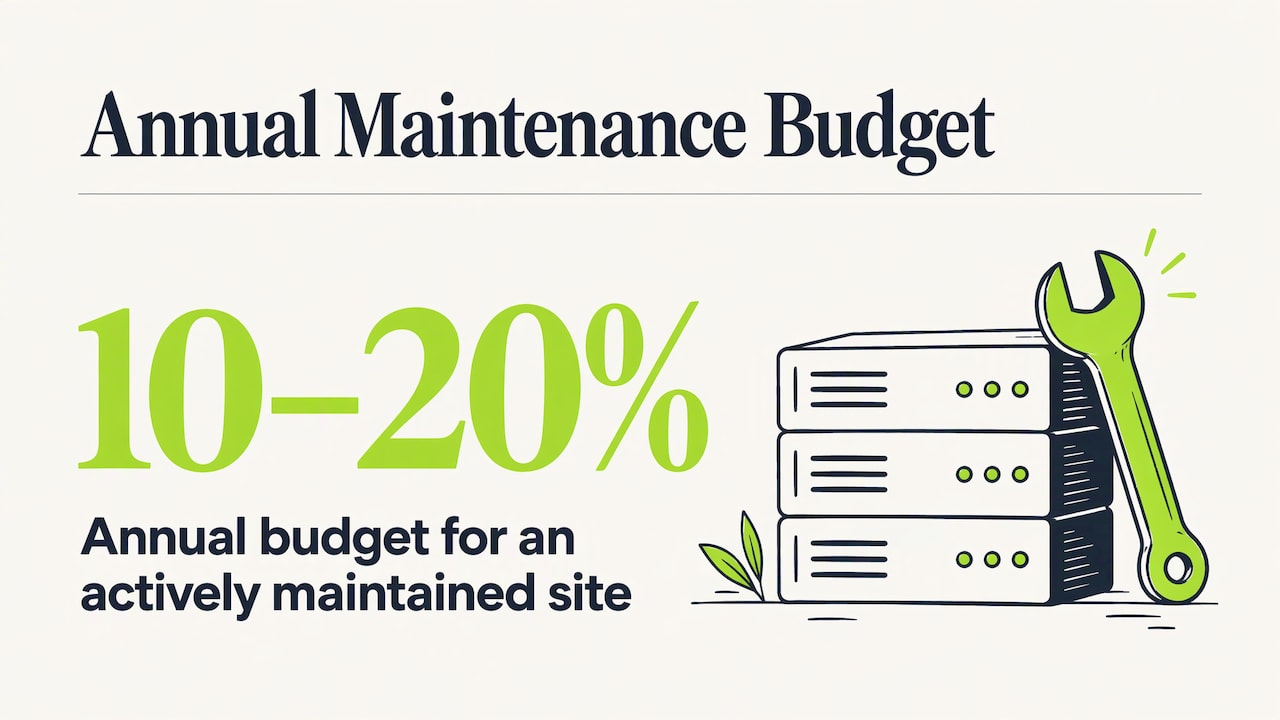
A website needs looking after. The same seven-stage guide lists security and dependency updates, broken-link and accessibility checks, content updates and performance monitoring. It suggests budgeting 10 to 20 per cent of the original build cost each year for an actively maintained site. That is one company’s guideline, so treat it as a starting point and agree what support you need before the project starts. My packages include a 30-day defect-fix promise. Hosting and ongoing maintenance are separate and agreed before work begins.
What affects cost and timescale in the UK
No two custom sites cost the same. These factors do the most to move the price and the schedule:
- Number of pages and page types. A site with one repeated layout is quicker than one with ten different layouts.
- Integrations. Payments, booking systems, email tools and similar connections add build and testing time.
- Design detail. Highly detailed animations and pixel-exact layouts take longer than a clean, simple design.
- Content readiness. Waiting for text and images pauses the whole project.
- Review rounds. Each extra round of changes adds days.
- Who is building. Agencies, freelancers and part-time developers differ in speed, price and availability.
Figures from a UK cost estimator suggest agency custom builds fall between £4,250 and £17,000 over 8 to 30 weeks. Use those as a rough picture of the agency market, not a quote. The honest way to get a price is a short conversation about what you need, followed by a written scope.
My introductory website packages are published on the services page: Starter £55, Business £110 and Premium from £180, with custom Android apps from £300. Anything beyond a package is agreed with you first, in writing.
Custom Android app development: how it works
A custom Android app follows a path much like a website, with a few extra steps.
- Requirements. What problem does the app solve, and who uses it? Is it for one person, a family, or a business?
- Design. Screens, buttons, text size and how someone moves through the app. For some users this needs real care.
- Build. The app is written and tested on real devices.
- Testing. Automated checks such as linting and unit tests can run alongside manual testing, security review and performance checks.
- Release. The app is delivered to you as a file that is installed directly on the device, which is called sideloading. My custom Android apps are not distributed through the Google Play Store.
- Updates. Android versions change, so apps need occasional updates to keep working well.
What to think about before commissioning an app
Before you start, decide these things:
- Who will use it, and on which devices? An older phone and a new tablet can behave differently.
- How will it be installed and updated? A sideloaded app is installed from a file rather than the Play Store, so agree who installs it and how updates reach the device.
- Who looks after it afterwards? Agree support and updates before the build starts.
- Do you need it to be open source? Some of my projects are, which lets others check and reuse the code.
- What happens to your data? Ask for a plain-English explanation of what the app stores.
Designing for accessibility from the start
Accessibility is easiest, and cheapest, when it is planned from the first conversation. Government guidance on public-sector sites is a useful model. GOV.UK guidance says public-sector websites and apps must meet accessibility standards and publish an accessibility statement. It tells teams to check a sample of pages against WCAG 2.2 AA and to make sure new features are accessible. It also says accessibility should be built into processes and planning.
That legal duty applies to public bodies. A private business is not covered in the same way, but the principle helps anyone. In practice it means:
- Text that is easy to read and can be enlarged.
- Good colour contrast.
- Buttons and links that are large and clearly labelled.
- Pages that work with a keyboard and a screen reader.
- Simple, predictable layouts.
If you or your users have particular needs, say so at the start. I explain how I handle this on my accessibility and getting help page.
My perspective
I build digital things because a real problem needed solving. My younger brother James has Down syndrome and is non-verbal autistic. That is why I made James Sounds, a free communication soundboard that any family can use. It changed how I think about software. A tool is only good if the person it is meant for can actually use it.
That is how I approach custom websites and Android apps. I start with the person, not the technology. I ask what you need, write down a clear scope, and explain each step in plain English. If something is not needed, I say so, because an affordable project is one with no wasted work.
I work full-time in another job, and I take on private projects at weekends. I think it is better to say that openly. It means each project gets my full attention while I am working on it, and we agree timings together from the start. Small projects suit this way of working well.
Many of my projects include open-source parts. That keeps the work open to scrutiny and useful to other people. For a small business or an individual, it can also mean you are not tied to anything you do not understand.
If you have a practical problem and want a clear, honest conversation about solving it, that is the kind of project I enjoy most.
David
Working with me
I offer three website packages, Starter (£55), Business (£110) and Premium (from £180), plus custom Android apps from £300 and technology and software advice. You can see what each covers on my services page. If you are not sure which fits, start with a conversation about what you want the site to do.
If you are a parent or carer looking for a communication tool, you can try my free picture soundboard in your browser, including its edit mode. For how I run projects, changes and cancellations, read how we work together. To discuss a website or app, go to my home page and get in touch.
How to prepare for a custom website project
A little preparation makes any project faster, cheaper and less stressful. Before you contact a developer:
- Write one sentence on the site’s purpose. For example: “Customers should be able to see my services and request a quote.”
- List the pages you think you need. A rough list is fine.
- Collect your content. Logo, photos, opening hours, prices and descriptions.
- Pick two or three example sites. Note what you like about each.
- Decide who gives final approval. One person giving feedback avoids conflicting changes.
- Think about upkeep. Who will update text and photos after launch?
With these in hand, the first conversation can go straight to scope and timing.
Common mistakes to avoid
- Starting without a clear purpose. The site ends up trying to do everything.
- Adding features “just in case”. Each one adds cost and upkeep. Add them later if you need them.
- Leaving content until the end. This is the most common reason projects slip.
- Skipping a phone check. Many visitors will arrive on a mobile.
- Ignoring upkeep. Plan for updates and security from the start.
- Unclear agreements. Get scope, timings and what happens if plans change in writing.
FAQ
What is the difference between custom and template websites?
A template site starts from a ready-made design and you fit your content into it. A custom site is planned and built around your needs. Custom gives you more control over layout, features and accessibility, and a template is quicker for simple needs.
How long does a custom website take?
It depends on size, features and how quickly you provide content and feedback. UK agency builds are often estimated at 8 to 30 weeks. A small, clearly scoped site can be much quicker: my packages are estimated at 1 to 2 weekends for a Starter Website, 2 to 3 for a Business Website and 3 to 4 for a Premium Website, agreed around my current workload. Agree a timeline in writing before you start.
Do I need a custom Android app, or is a website enough?
If your users only need information or simple forms, a website that works well on phones is often enough. An app makes sense when you need something that works as its own tool on the device, such as a communication aid or a utility. We can talk through which suits your case.
Does a website need ongoing maintenance?
Yes. Sites need security updates, link checks, accessibility checks and content updates. One planning guide suggests 10 to 20 per cent of the build cost per year for an actively maintained site. Agree what support you want at the start.
Can a website or app be designed for accessibility needs?
Yes, and it works best when planned from the start. Aim for clear text, strong contrast, large controls and keyboard support, in line with WCAG 2.2 AA. Tell me about any needs in your first message.
Sources
- Website Development Planning Process: 7-Stage Guide
- Custom Build Pricing UK
- GOV.UK: Make your website or app accessible and publish an accessibility statement